Usage Guide
Jutsu provides an interactive, keyboard-driven interface to compose and run jj (Jujutsu) commands safely and efficiently. By mapping jj’s command taxonomy into an organized, multi-pane layout, you can quickly explore available subcommands and flags with immediate documentation feedback.
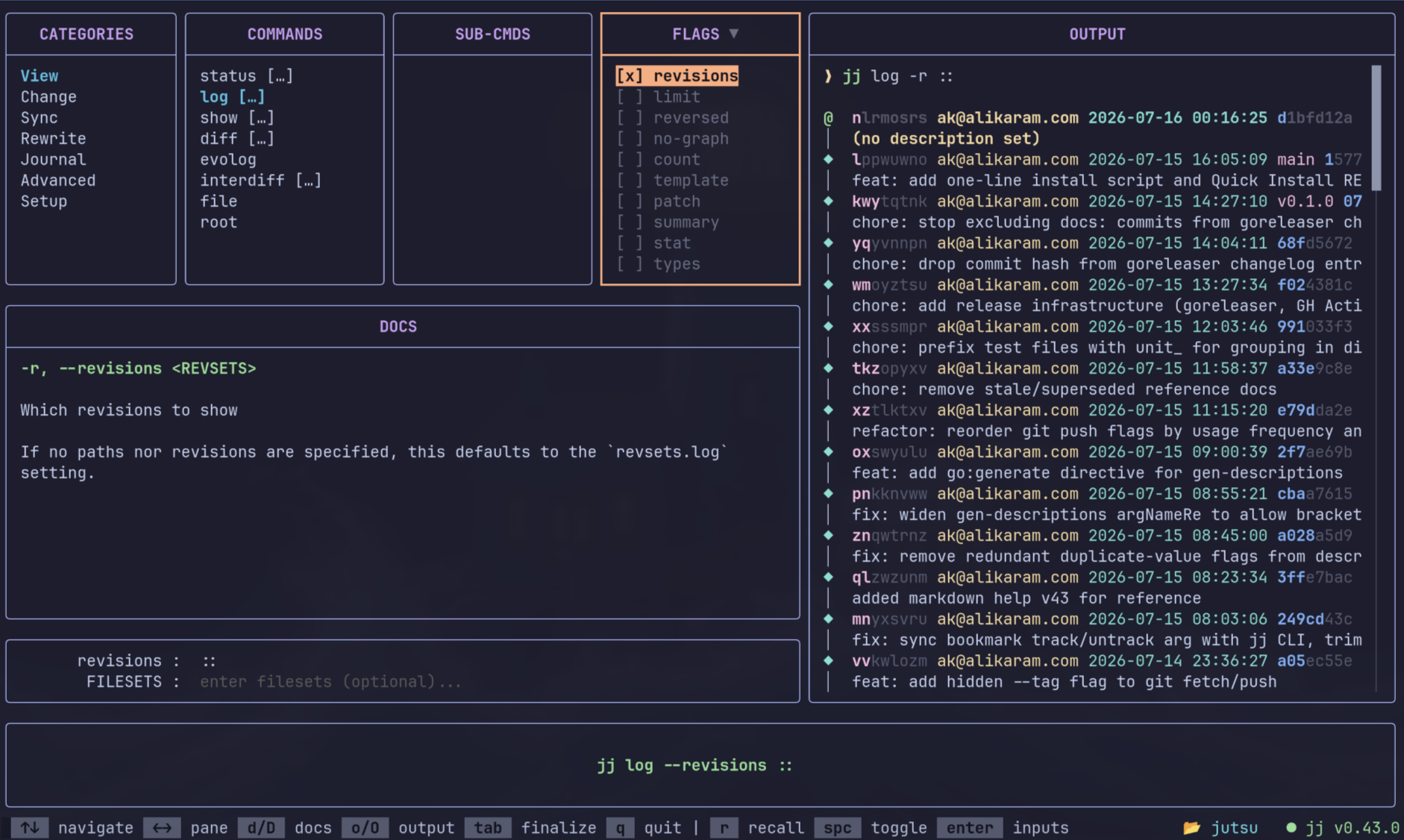
Jutsu’s interface is organized into six primary panes and eight focus states, moving from broad category selection through command, subcommand, flag, and input selection, out to a live command preview and executed output. The topics below cover each part of that model in depth:
- Interface — panes, focus states, layout, and persistent selection indicators.
- Navigation — keyboard controls, horizontal focus movement, pane shortcuts, and quitting.
- Commands — categories, command selection, subcommands, and the command-preview mental model.
- Flags — optional flags, mandatory flags, conflicts, required groups, and flag indicators.
- Inputs — command/flag values, field navigation, required-field validation, and the validation flash.
- Global Options — the Global Options modal, options that precede the command, value entry, and pinned indicators.
- Running Commands — background execution, standalone terminal handoffs, and multiplexer handoffs.
- Output & Docs — pane navigation, scrolling, enlargement, horizontal panning, and clipboard copying.
How the pieces fit together
Section titled “How the pieces fit together”Building a Jutsu command follows a simple mental model:
What do I want to do? → CommandsHow should it behave? → FlagsWhat values are needed? → InputsWhich repository/context? → Global OptionsEach concept has one canonical page above; the Deep Dive Tutorials below show them combined into concrete, end-to-end scenarios.
Deep Dive Tutorials
Section titled “Deep Dive Tutorials”To see Jutsu in action and learn specific workflows, explore our dedicated tutorials:
- 👉 Composing a Command — A step-by-step walk-through of selecting, configuring, and building command strings.
- 👉 Inputs and Global Options — Mastering the dynamic inputs pane and utilizing global options.
- 👉 Interactive and Remote Operations — Working with full-terminal handoffs, SSH keys, credential helpers, and multiplexer splits.